Which photos can the checker read?
Designed for
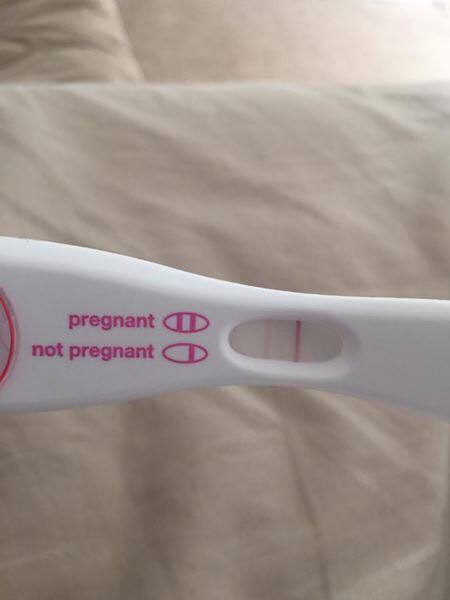
One physical pregnancy test with a reading window. Include the whole window, its control area and enough of the test body to identify the layout.
Not supported
Digital word displays, bare strips, multiple tests in one photo or images without a pregnancy test. A supported format can still be too unclear to read.
- Check the timing. Use the exact reading window in your test’s leaflet. The photo cannot establish when a line appeared.
- Show one complete test. Place it on a plain surface. Keep fingers and packaging away from the reading window.
- Keep the lines in focus. Use even light without flash glare or heavy shadows. Don’t use filters, color inversion or contrast edits.
- Check the file. JPEG, PNG, WebP, HEIC, HEIF, AVIF, GIF, TIFF or BMP, up to 25 MiB; no more than 12000 pixels per side or 26 megapixels. For animations or images with multiple pages, only the first frame or page is read; HEIC/HEIF uses the primary photo.
Taking another photo does not restart a physical test’s reading window. Read why timing matters.
Pregnancy test line examples
Pregnancy tests can show lines, plus or minus signs, or words on a digital screen. Start with your test’s own result diagrams. In the line examples below, C is control and T is test.
Illustrations, not photographs or checker results. They cannot identify the result of your own test.
Two colored lines
For this two line layout, both C and T are visible. A lighter T line still needs to match your product’s instructions and reading time.
Control line only
C is visible; T is not. Compare with your test’s diagram. An early negative result does not rule out pregnancy.
No control line
The required C line is missing. Even with a mark at T, this illustrated test is invalid. It is not a negative result. Use a new test.
Plus or minus signs
In this layout, a plus sign is the positive pattern and a minus sign is the negative pattern. Both need a line in the separate control window. Follow your test’s reading time.
See Clearblue’s symbol guideDigital word displays
These show “Pregnant” or “Not Pregnant” on a screen instead of lines. Read the display using the product’s instructions. Digital tests are not supported by this photo checker.
See Clearblue’s digital guideA missing required control indicator means the test did not work. It does not mean the result is negative. Office on Women’s Health: control indicators. For a manufacturer’s two line example, see First Response’s line guide.
Faint positive, evaporation line or indent?
A faint line is not automatically a negative result. On some line tests, a valid positive line can be lighter than the control. It still needs to match that product’s result diagram, with the required control indicator and correct timing. Clearblue’s guidance on faint lines.
Faint positive line
A light test line can occur when testing early or with diluted urine. Dye colors and positive patterns vary by product; do not apply one brand’s diagram to every test. Clearblue: why a line may be faint.
Evaporation line
A mark may appear as a test dries after its reading window. Do not reinterpret a late mark as a new positive result. Cleveland Clinic: evaporation lines.
Indent or reagent mark
A colorless or gray mark is not automatically a positive line. First Response describes reagent marks that look cream or gray that differ from the pink lines its positive result requires. That guidance is specific to that product, not a rule for every photograph. First Response: reagent marks.
When to test and when to read it
When to take a pregnancy test
The NHS advises that most tests can be taken from the first day of a missed period. If you don’t know when your period is due, test at least 21 days after the last unprotected sex. Early testing can miss a pregnancy. NHS: when to test.
The FDA notes that the first urine of the morning may improve detection. Follow your particular product’s directions, especially when testing early. FDA: home pregnancy tests.
When to read the physical result
The waiting time after use and the final time to read a result are separate from the date you take the test. Follow both times in your exact product’s leaflet; there is no universal reading window. Cleveland Clinic: reading the result.
Use the pregnancy test date calculator if you need a timing estimate rather than help reading a photo.
What to do next
If your physical test is positive
Contact a healthcare professional about confirmation and next steps. You can ask for confidential advice whether the result is welcome, unwanted or uncertain. MedlinePlus: positive results; NHS: care and options.
Negative pregnancy test but no period?
A test taken too early can be negative even when you are pregnant. FDA: false negatives. If you still think pregnancy is possible, the NHS advises waiting a few days and testing again. Contact a healthcare professional if a second test is negative and your period has not arrived. NHS: after a negative result.
If the test is invalid or still unclear
Repeat an invalid physical test with a new one, following its instructions. If you cannot interpret your result, ask a healthcare professional for help rather than relying on a photo reader to decide. MedlinePlus: understanding results.
For everyday pregnancy safety questions, explore our product safety reports, A to Z safety guides and ingredient guides.
Pregnancy test checker questions
Can this online checker help me read my pregnancy test?
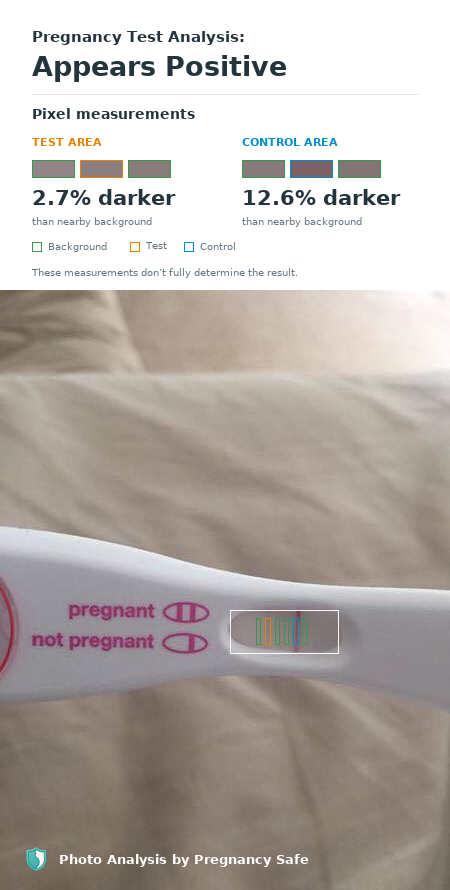
The checker gives you a second look at a test you have already taken, with a photo reading and an annotated view of its result window. It reads the photo, not pregnancy hormones, so it cannot confirm or rule out pregnancy. Compare the report with your physical test and its instructions.
How accurate is this AI pregnancy test reader?
This reader provides an experimental second look at the visible test lines. It has not been clinically validated, so we cannot give an accuracy percentage. It can misread a result in either direction. Use your physical test’s instructions as the reference, and ask a healthcare professional if you remain unsure.
Does it work with Clearblue, First Response or test strips?
Eligibility depends on the test format and photo, not just the brand. The checker is designed for physical tests with reading windows. Digital displays and bare strips are not supported, and we have not established reliable performance across every brand or model. Follow the leaflet for your exact test.
Is the pregnancy test checker free, and do I need an app?
Yes. Uploading a photo, checking it and viewing the report are free. Results appear in your browser, with no app download or payment required. Brief limits may apply when the service is busy or receives too many requests.
Can I upload an iPhone photo or HEIC file?
The checker accepts JPEG, PNG, WebP, HEIC, HEIF, AVIF, GIF, TIFF and BMP, up to 25 MiB, with a maximum of 12000 pixels per side and 26 megapixels. For animations or images with multiple pages, only the first frame or page is read; HEIC/HEIF uses the primary photo. Keep the complete reading window visible.
Can I use a pregnancy test inverter or edit the photo first?
Use the original, unfiltered photo for this checker. Inverting colors, increasing contrast or drawing over a line changes the image being assessed; an edited image is not independent confirmation of the physical result. If the result is unclear, follow your test’s instructions rather than trying to make a line appear.
What if the checker is unavailable or reaches a usage limit?
An error or limit message is not a test result. Follow any wait time shown. The checker does not automatically retry an upload. If it asks you to start over, do that before a new attempt; otherwise use the retry control provided. You can still read this guide without uploading a photo.
Can line darkness tell me my hCG level or weeks pregnant?
No. This tool does not measure hCG, date a pregnancy or assess whether it is progressing normally. Its line brightness graphics are not a confidence score. Do not use them to compare pregnancy progression between photos.
Can birth control or fertility medicines affect my test?
The contraceptive pill does not stop a pregnancy test working, according to the NHS. Some fertility medicines contain hCG and can cause a false positive result. Ask your fertility care team about interpretation and timing if you use them. Office on Women’s Health: medicines and test results.
About this guide and its sources
Prepared for Pregnancy Safe · Updated October 2, 2026. General information, not personal medical advice. The sources below support the testing guidance, not the accuracy of our photo reader. This page does not claim independent clinical review.
- FDA: Pregnancy tests for home use
- NHS: Doing a pregnancy test
- MedlinePlus: Pregnancy test
- Cleveland Clinic: Pregnancy tests
- Office on Women’s Health: Pregnancy tests
- First Response: Faint lines and reagent marks (manufacturer guidance)
- Clearblue: Faint lines (manufacturer guidance)
- NHS: Ectopic pregnancy symptoms